Coloring games for kids: 2-5 y
- 4.3
- Rating
- 5.00M
- Installs
- Free
- Price
 Analysis by App-foxy
When I want a quiet activity for a young child that feels more playful than a worksheet, Coloring games for kids: 2-5 y is the kind of app I reach for first. It turns coloring and simple drawing into a bright, touch-friendly game, so a child can experiment with colors without needing to read instructions or understand a complicated menu. I tested it with the mindset of a parent choosing something for a short indoor activity, and my overall impression is positive: it is approachable, cheerful, and easy to start, although it works best when an adult sets up the experience and keeps expectations realistic.
This is an educational game from Bebi Family: preschool learning games for kids, aimed at toddlers and preschoolers. It is free to install, carries an Everyone age rating, and has reached over five million installs. Its average rating is 4.3 from around thirty-one thousand ratings, which fits my experience: the basic idea is immediately useful, but the app is not designed to replace richer creative tools or guided learning with a parent.
How the everyday coloring routine works
The simplest workflow is also the strongest one. I open the game, hand the device to the child, and let them choose a coloring activity rather than explaining a long sequence of steps. The large visual elements make the first interaction fairly natural. A toddler can tap colors, drag a finger around the screen, and see an immediate result. That quick response matters because children in this age range often lose interest while waiting for an adult to demonstrate every control.
You May Also Like

 Blood Strike: 2.5 Anniversary
Blood Strike’s Loadouts Turn Every Drop Into a Tactical Gamble
A close look at Blood Strike’s custom loadouts: how fast access to signature weapons reshapes its battle royale rhythm, rewards preparation, and narrows the gap between fights.

 Pandora - Music & Podcasts
Pandora’s Music Is Easy to Start, but Harder to Recover
Pandora’s strength is its low-effort path from a seed to a station. Its weak spot is how much confidence it asks you to place in connection, setup, and quiet recovery.

 8 Ball Pool
 Is Built on Rivalries, Rematches, and Routine
A close look at the rivalries, rematches, shared routines, and unanswered safety questions that turn a quick pool match into a persistent mobile community.

 Samsung Music
’s Quiet Strength Is Playing What You Already Own
Its reach comes less from spectacle than from dependable access to a personal library. That simplicity is both the app’s strongest retention engine and its ceiling.

 AccuWeather: Weather Radar
AccuWeather Review: A Quick, Clear Forecast for Everyday Decisions
For everyday plans, the best forecast is the one you can understand quickly. AccuWeather makes rain timing, radar, and local conditions easy to act on, with a few trade-offs.

 Hill Climb Racing
Why Hill Climb Racing Still Turns Crashes Into One More Run
A tiny car, a bumpy hill and one more upgrade: Hill Climb Racing keeps resurfacing because its simple chaos makes every near-miss feel personal.
More From Our News Desk



For a two-year-old, I would treat the app as an exploration tool. The goal is not to complete a picture neatly. It is to practice tapping, dragging, noticing color differences, and understanding that a movement on the screen creates an effect. Older preschoolers can use the same activity with more intention, choosing colors for particular parts of a picture or trying to stay inside an area. The same screen therefore supports different levels of participation, even though the game itself remains simple.
I found it more useful to begin with a short, clear invitation such as “Can you make this part blue?” rather than asking a child to color an entire picture. A small goal keeps the session focused and gives the child a chance to make a decision. After that, I let them take over. This approach also makes the app feel less like passive screen time and more like a small creative exercise.
The drawing side is especially helpful when a child is tired of following pictures. Coloring activities can offer structure, while free drawing encourages experimentation. I would alternate between them instead of staying with one type for too long. A child who becomes frustrated by a detailed picture may enjoy making broad glowing marks, while a child who does not know what to draw may benefit from the boundaries of a prepared image.
One practical routine works well after preschool or dinner: use the app for a few minutes, ask the child to name two colors they used, and then close it before the activity becomes repetitive. That final conversation is where some of the educational value appears. The game supplies the visual and touch interaction, but the adult supplies language, comparison, and encouragement. Without that small bit of interaction, the experience is mainly entertainment.
What the interface feels like for small hands
The design is clearly built around young users rather than adults who want a sophisticated drawing program. Controls are visual, actions are direct, and there is little need for reading. That makes it suitable for children who cannot yet navigate ordinary art applications. I also like that the app does not require a child to understand layers, brushes, palettes, or file management before making something visible.
There is a trade-off here. Simplicity reduces confusion, but it also reduces control. A child looking for precise line work, detailed brush choices, or a serious digital sketchbook will outgrow this quickly. The app succeeds by lowering the entry barrier, not by offering the depth of a full creative suite.
Parents should also stay nearby during the first sessions. Young children can tap their way out of an activity, open an unexpected screen, or press controls simply because they are colorful. I would not assume that a toddler can manage the whole experience independently just because the main coloring action is easy. A quick setup by an adult prevents most of the unnecessary wandering.
Settings I would check before handing over the device
My first check would be the device’s general sound level and notification behavior. A colorful children’s game can become distracting if alerts from other apps appear during play, so I prefer to enable a child-friendly device mode or temporarily silence unrelated notifications. This is not a special feature of the game; it is a simple habit that makes the session calmer and keeps the child inside the activity.
I would also look at the purchase protections on the phone or tablet. The game is free, but optional in-app purchases range from $1.99 to $49.99 per item. That is important for any family device used by a child. Before starting, I would require confirmation for purchases and avoid leaving a payment method available for one-tap buying. The best child-friendly setup is one where the young user can explore the coloring screen without being able to make an accidental purchase.
The app’s current version is 1.07.13 and it requires Android 6.0 or later. If the device is an older family tablet, I would check compatibility before planning a drawing session. A child does not understand why an activity suddenly fails to install, and an adult can avoid that disappointment by preparing the device first.
I would also place the tablet on a stable surface rather than expecting a toddler to hold it comfortably while drawing. Finger movements are easier when the screen does not wobble, and a stand leaves both hands available. A stylus is not necessary for the intended age group, and I would not add one unless the child already enjoys controlled drawing. For most toddlers, the broad movement of a finger is more natural.
Small habits that make the game work faster
Experienced use is less about discovering secret controls and more about repeating a reliable routine. I start by opening the activity I want before giving the device to the child. That removes the common delay where the child taps through every available option and becomes distracted before coloring begins. If the child is choosing independently, I stay close enough to redirect without taking over.
I also keep the first task deliberately small. Instead of saying “finish the picture,” I suggest one color or one area. This reduces pressure and helps a child who is still learning how dragging differs from tapping. Once the child understands the response, I stop giving instructions and let them make choices. Too much adult guidance can turn a playful app into a test.
Another useful habit is to use the same short sequence each time: choose an activity, try one color, add a second color, talk about the result, and finish. Repetition gives a young child a sense of control. It also helps parents judge whether the app is still engaging or whether the child is simply tapping without interest.
For siblings or children at different ages, I would not ask them to use it in exactly the same way. A younger child can work on touch coordination and color recognition, while an older preschooler can make a deliberate color plan or explain why they chose certain shades. The app is more flexible when the adult changes the challenge instead of expecting the software to provide a separate lesson for every age.
One non-obvious advantage is that the app can serve as a low-pressure transition activity. I would use it while waiting for a meal, settling down after a busy outing, or giving a child a calm alternative during a short adult task. I would avoid using it as a reward for every behavior, though. If the game becomes the only attractive option, the child may focus on earning screen time rather than enjoying the creative activity.
Where it fits beside ordinary alternatives
Compared with paper and crayons, the game is cleaner and faster to reset. There is no need to find a sharpener, wipe a table, or replace a page after a mistake. That makes it convenient for travel and small living spaces. Paper still wins for tactile learning, hand pressure, and the satisfaction of holding a finished drawing, so I would use the app alongside physical art rather than treating it as a replacement.
Compared with a general drawing application, this game is much easier for a toddler to enter. A standard art app may offer more brushes and greater freedom, but those choices can overwhelm a child who cannot read or remember what each icon does. Here, the narrower experience is a benefit for the intended age group. The trade-off is that older children may find it repetitive once they want more control.
Compared with educational games based on letters, numbers, or puzzles, this title is less focused on measurable academic progress. Its learning value comes through color recognition, touch coordination, visual attention, and creative decision-making. Parents who want phonics practice or structured counting lessons should choose a different type of app. Parents who want a gentle creative break will find a better match here.
Limits that matter before making it a regular activity
The biggest limitation is depth. This is not an art course, a portfolio tool, or a carefully sequenced preschool curriculum. It offers an accessible way to color and draw, but it cannot provide the feedback a teacher or parent can give. A child may spend time tapping bright areas without really thinking about color or shape, especially if nobody talks with them about what they are doing.
The free entry point is appealing, but families should remember that optional purchases are part of the experience. I would not install it on a child’s unrestricted account. The purchase range makes parental controls a practical requirement, not an optional extra. If a family wants a completely purchase-free setup, paper supplies or a carefully selected offline activity may be more comfortable.
The age range also creates an important exception. A two-year-old may need help with navigation and may use the game mainly for sensory play. A five-year-old may want clearer goals, more variety, or a larger creative canvas. That does not make the app unsuitable for either age, but it means the adult should adjust the session. Expecting the same level of challenge across the entire range will lead to disappointment.
I would skip this game for a child who becomes overstimulated by glowing visuals, colorful effects, or touch-based play. I would also choose a different option for a child who strongly prefers physical materials or needs a structured lesson with clear progress. In those cases, a paper coloring book, a guided art activity, or a more curriculum-focused educational game may be the better choice.
For families concerned about screen habits, the right question is not whether this app is educational enough to justify unlimited use. It is whether a short, supervised session serves a clear purpose. I think it can, particularly when the child is encouraged to talk, compare colors, and continue the idea away from the screen. The activity becomes weaker when it is used simply to keep a child occupied for a long stretch.
My verdict after using it as a preschool activity
The best reason to choose this game is its low-friction start. A young child can reach the central coloring experience quickly, and a parent does not need to teach a complicated interface. That makes it a practical choice for short creative sessions, especially on a compatible Android device that is already set up for children.
I appreciate that it sits between a toy and a learning aid. It is playful enough to attract a toddler, but it gives adults openings to discuss colors, movements, choices, and pictures. The strongest results come from using it as a shared activity rather than handing over the device and walking away. A few minutes of conversation can turn simple tapping into a more meaningful preschool exercise.
The developer, Bebi Family: preschool learning games for kids, has positioned this as an accessible educational game rather than a professional drawing tool, and that distinction is important. The Everyone rating makes it broadly suitable, while the free price makes trying it easy. Still, the in-app purchase range means I would secure the device before a child uses it, and I would keep sessions short enough that the bright presentation remains enjoyable instead of tiring.
After reaching more than five million installs and earning a 4.3 average from roughly thirty-one thousand ratings, it is clearly a familiar choice for many families. My recommendation is specific: use it when you want a simple coloring break, a travel activity, or a first step into digital drawing for a toddler or preschooler. Do not choose it as a substitute for crayons, conversation, or a structured early-learning program. With that boundary in mind, it is a friendly and useful addition to a child’s activity rotation.
FAQs for Coloring games for kids: 2-5 y
01What age group is the app suitable for?
Coloring Games for Kids: 2-5 y is specifically designed for young children aged 2 to 5 years old. It offers age-appropriate content that fosters creativity and is easy for toddlers and preschoolers to navigate. The app includes simple controls and engaging activities to stimulate early learning and development.
02Does the app require an internet connection?
No, Coloring Games for Kids: 2-5 y can be used offline. This feature makes it convenient for parents to entertain their children without the need for a constant internet connection, making it an excellent choice for travel or areas with limited connectivity.
03Are there any in-app purchases or advertisements?
The app may include optional in-app purchases to unlock additional content or features. However, it is designed with child safety in mind, ensuring that advertisements are minimal and suitable for young audiences. Parents can also enable settings to restrict purchases and control app usage.
04What types of activities are included in the app?
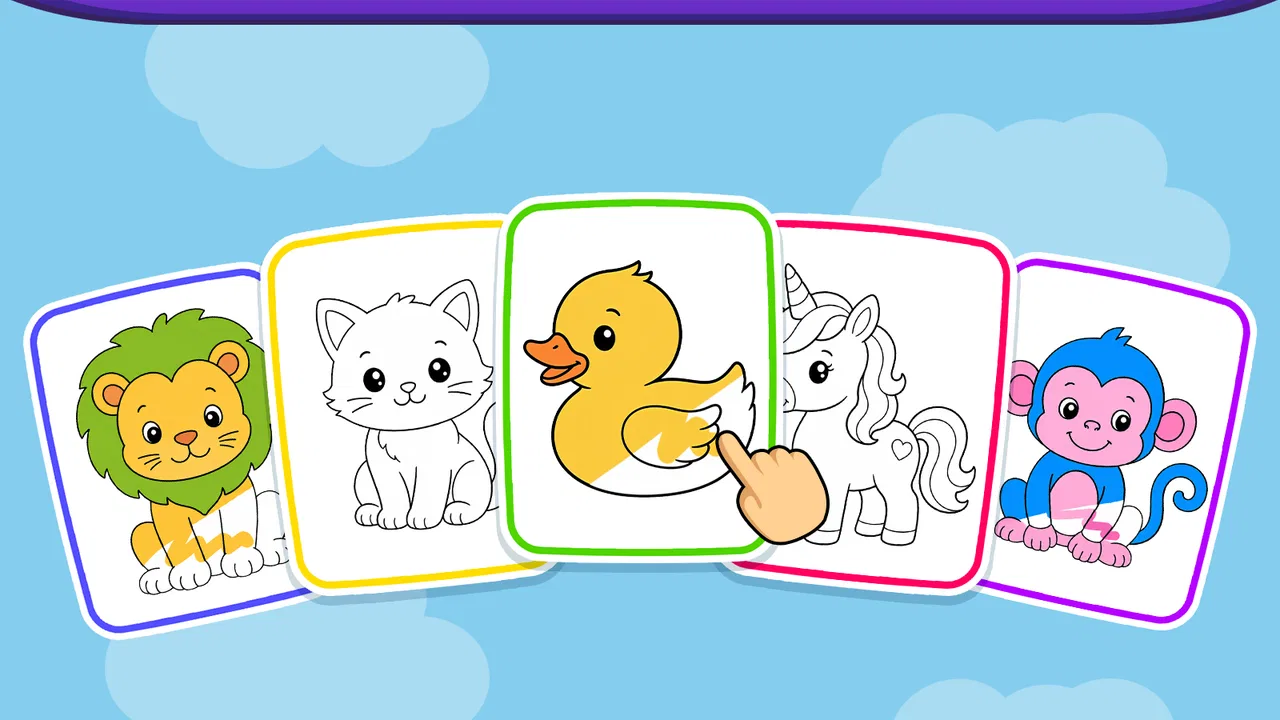
The app features a variety of coloring pages, puzzles, and interactive games that promote creativity and learning. Children can explore different themes, such as animals, nature, and fantasy, while developing fine motor skills and color recognition. The activities are designed to be both educational and entertaining.
05Is the app user-friendly for young children?
Yes, the app's interface is designed to be intuitive and easy for young children to use. With large buttons and simple navigation, toddlers can easily select and complete activities with minimal assistance from adults. The app aims to encourage independent play while ensuring a safe and enjoyable experience.
Pros
- Easy-to-use interface for toddlers.
- Wide variety of coloring pages.
- Encourages creativity and learning.
- No in-app purchases needed.
- Supports offline play.
Cons
- Limited advanced features for older kids.
- Some ads can be distracting.
- Repetitive background music.
- Limited color palette options.
- Occasional lag on older devices.

Coloring games for kids: 2-5 y
Gallery